

Empower your inbox, simplify your life with just one tap. Download the app now...

Empower your inbox, simplify your life with just one tap. Download the app now...
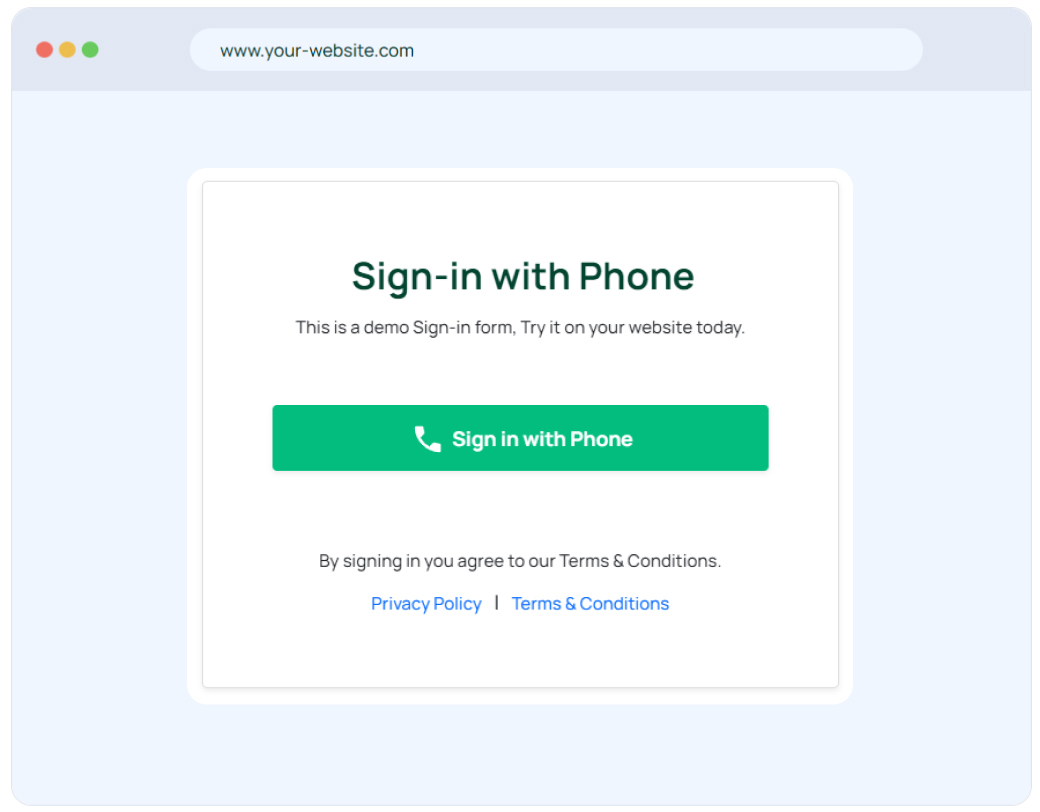
This is a demo Sign-in form, Try it on your website today.
Imagine the power of easy sign-in to impress your potential
customers
with impressive on boarding emails.
Follow the step-by-step instructions outlined in our comprehensive
"Sign-in with Phone"
blog to get started.
We will create on-boarding Emails for your brand and will send it to all new users via Free SMS + Emails.
Send welcoming email to kickstart new users on-boarding journey.
Send branded product or service introduction email, showcasing your product's features and benefits.
Send exclusive promotions and offers through another engaging email.
Ask for user feedback, provide support/contact details, survey email.
Continue the conversation with more user engagement email.
Treat your website visitors well with the best brand/product/service offering emails with configurable day wise schedule.
Impress your potential customers with a personalized, day-wise email schedule that aligns with your brand, product, or service. Elevate your customer onboarding experience and keep them engaged from day one.
Phone email's sign in with phone number plugin can be used in website with various tech-stacks.
Use the relevant code from the below:
<!-- PHP Code -->
    <button
    style="display: flex; align-items: center; justify-content: space-between; padding: 10px 15px; background-color: #02BD7E; font-weight: bold; color: #ffffff; border: none; border-radius: 3px; font-size: inherit;cursor:pointer;"
    id="btn_ph_login"
    name="btn_ph_login"
    type="button"
    onclick="window.open('https://www.phone.email/auth/sign-in?countrycode=$COUNTRY_CODE&phone_no=$PHONE_NO&redirect_url=$REDIRECT_URL', 'peLoginWindow', 'toolbar=0,scrollbars=0,location=0,statusbar=0,menubar=0,resizable=0, width=500, height=500, top=' + (screen.height - 500) / 2 + ', left=' + (screen.width - 500) / 2);">
    <svg
    xmlns="http://www.w3.org/2000/svg"
    style="margin-right: 5px; fill: #ffffff"
    height="24"
    viewBox="0 -960 960 960"
    width="24">
    <path d="M798-120q-125 0-247-54.5T329-329Q229-429 174.5-551T120-798q0-18 12-30t30-12h162q14 0 25 9.5t13 22.5l26 140q2 16-1 27t-11 19l-97 98q20 37 47.5 71.5T387-386q31 31 65 57.5t72 48.5l94-94q9-9 23.5-13.5T670-390l138 28q14 4 23 14.5t9 23.5v162q0 18-12 30t-30 12Z"/>
    </svg>
Sign in with Phone Number
</button>
<!-- JWT Validation Code -->
    <?php

require 'vendor/autoload.php';
use Firebase\JWT\JWT;
use Firebase\JWT\Key;


if(isset($_GET['phtoken'])){
    try {
        $api_key = 'API_KEY'; // Please specify API key provided by Phone Email mobile application
        $decoded = JWT::decode($_GET['phtoken'], new Key($api_key, 'HS256'));
        $jwt_response = 1;  // JWT decoded successfully
        $jwt_phone = $decoded->country_code.$decoded->phone_no; // You will get user phone number here from JWT
    } catch (Exception $e) {
        $jwt_response = 0; // Invalid JWT
        $jwt_phone = '';
    }
}else{
    $jwt_response = 0; // Invalid JWT
    $jwt_phone = '';
}

?>
<!-- Node Js Code -->
const express = require('express');
const app = express();
app.get('/', (req, res) => {
  res.send(`
    <button
      style="display: flex; align-items: center; justify-content: space-between; padding: 10px 15px; background-color: #02BD7E; font-weight: bold; color: #ffffff; border: none; border-radius: 3px; font-size: inherit;cursor:pointer;"
      id="btn_ph_login"
      name="btn_ph_login"
      type="button"
      onclick="window.open('https://www.phone.email/auth/sign-in?countrycode=$COUNTRY_CODE&phone_no=$PHONE_NO&redirect_url=$REDIRECT_URL', 'peLoginWindow', 'toolbar=0,scrollbars=0,location=0,statusbar=0,menubar=0,resizable=0, width=500, height=500, top=' + (screen.height - 500) / 2 + ', left=' + (screen.width - 500) / 2);">"
      <svg
        xmlns="http://www.w3.org/2000/svg"
        style="margin-right: 5px; fill: #ffffff"
        height="24"
        viewBox="0 -960 960 960"
        width="24">
        <path d="M798-120q-125 0-247-54.5T329-329Q229-429 174.5-551T120-798q0-18 12-30t30-12h162q14 0 25 9.5t13 22.5l26 140q2 16-1 27t-11 19l-97 98q20 37 47.5 71.5T387-386q31 31 65 57.5t72 48.5l94-94q9-9 23.5-13.5T670-390l138 28q14 4 23 14.5t9 23.5v162q0 18-12 30t-30 12Z"/>
      </svg>
      Sign in with Phone Number
    </button>
  `);
});

app.listen(3000, () => {
  console.log('Server is running on http://localhost:3000');
});
<!-- JWT Validation Code -->
const jwt = require('jsonwebtoken');
const api_key = 'API_KEY'; // Replace with your actual API key

let jwt_response;
let jwt_phone;

if (process.argv[2]) {
  const token = process.argv[2];

  try {
    const decoded = jwt.verify(token, api_key, { algorithm: 'HS256' });
    jwt_response = 1; // JWT decoded successfully
    jwt_phone = decoded.country_code + decoded.phone_no;
  } catch (error) {
    jwt_response = 0; // Invalid JWT
    jwt_phone = '';
  }
} else {
  jwt_response = 0; // Invalid JWT
  jwt_phone = '';
}

console.log('JWT Response:', jwt_response);
console.log('JWT Phone:', jwt_phone);
One of the latest innovations in the realm of user authentication is the "Sign in with Phone" feature, which enables users to access merchant websites and dashboards effortlessly using their mobile numbers. This convenient and secure login method streamlines the user experience while ensuring data protection. In this article, we'll explore the benefits of "Sign in with Phone," how it works, and how merchants can implement it on their websites.